Submission Guide | Submission Process by Diamond Service Grading
Step-by-step submission process

The DSG submission guide

Ready to start grading? Follow these steps to submit your cards and let us do the rest. Set up an account, build your order in six quick steps, then pack and ship — first-timers welcome.

Six simple steps USPS signature confirmation Card details optional Track every order
Diamond Service Grading
Trading cards prepared and sleeved, ready to submit for grading
Phase 1

Set up your account

Create a free DSG account to submit cards, track orders, and manage your collection.

Phase 2

Build your order

Pick a service, add your cards, and check out in six quick online steps.

Phase 3

Pack & ship to DSG

Sleeve, protect, and mail your cards to us with signature confirmation.

Create AccountSelect ServiceEnter CardsPack & Ship

At a glance

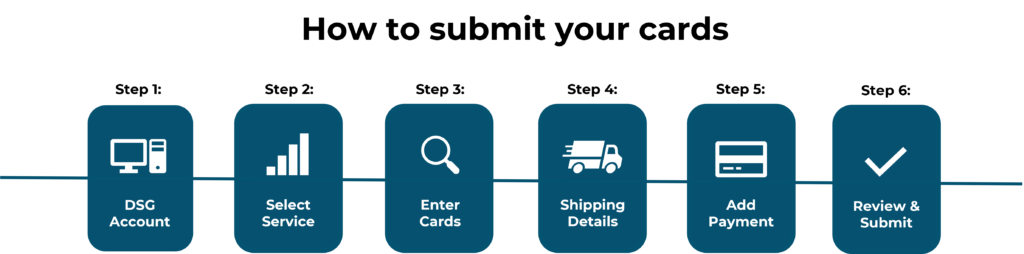
The online order flow

From entering your cards to confirming your shipping details, the whole submission happens in your browser before a single card leaves your hands.

Order flow showing Enter Cards leading to Shipping Details

Each step below walks you through exactly what you will see on screen.

Place your order

Six steps to submit online

Work through these in order. Most submissions take just a few minutes — and you can save card details for later if you would rather move quickly.

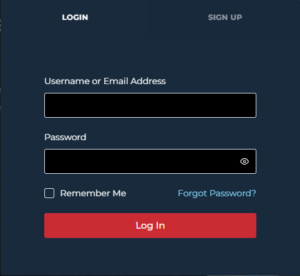
DSG account sign up and login panel
01Step one

Create or log in to your DSG account

Have you created your account yet? An account lets you easily submit cards, track orders, and manage your collection in one place.

  • To create an account: click the person icon next to ‘SUBMIT HERE’ in the top menu, then open the ‘Sign Up’ tab and choose a username and password.
  • To log in: click the same person icon, open the ‘Login’ tab, and enter your username and password.
Create your account
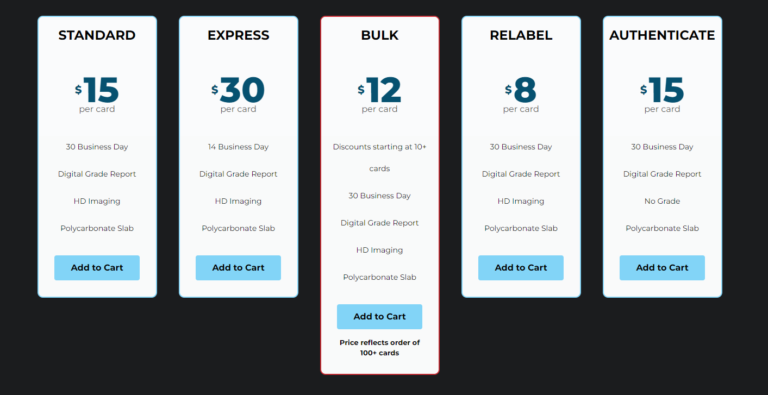
Choosing a DSG service level before adding cards to the cart
02Step two

Select your service

The service you choose comes down to the type of card and how quickly you want it back. Every tier gets the same full grade and 32-subgrade report — only the turnaround changes.

  • Standard — our regular 10 business day turnaround for everyday submissions.
  • Express (3 days) or Expedited (1 day) when you need a card back faster.
  • Submitting 100 cards or more? Standard automatically applies bulk pricing — no separate product to select.
See all services & pricing
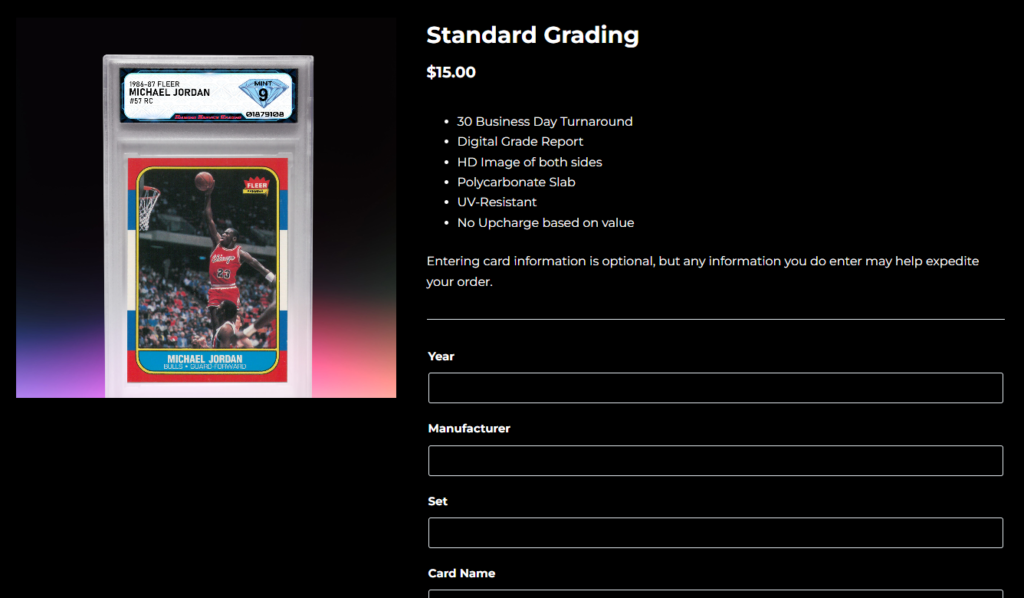
Adding card quantity and optional card details on a DSG product page
03Step three

Enter your cards

Entering card information is optional, but anything you do add may help expedite your order. When you are ready, add the quantity of cards you are submitting and proceed to your cart.

In a hurry? Skip the card details, set your quantity, and add the matching service to your cart — you can always note specifics later.
Entering billing and shipping details at DSG checkout
04Step four

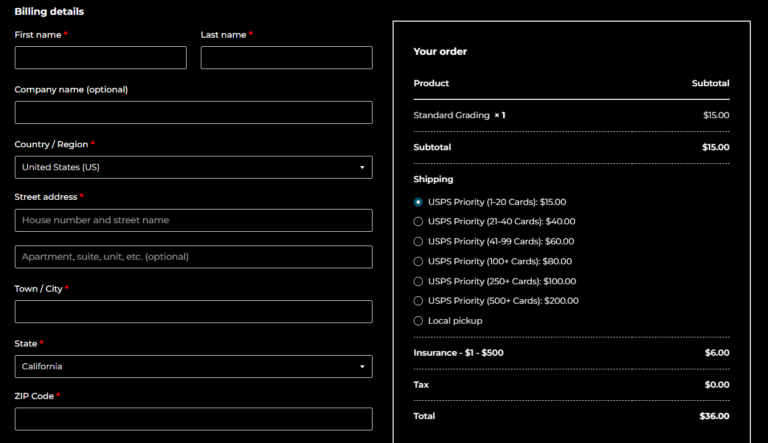
Add your shipping details

Fill in all billing and shipping information so your cards come back to the correct address. Then select the shipping option that matches the number of cards you are submitting.

  • We ship every domestic order back with USPS.
  • All packages require signature confirmation on delivery.
Prefer a different carrier? Contact us and we will arrange it.
Entering credit card payment information at DSG checkout
05Step five

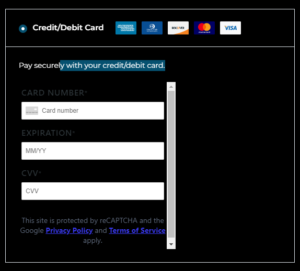
Add your payment

Payment is an easy step. Enter your credit card details to complete the order — we accept all major credit cards.

  • Visa, Mastercard, American Express, and Discover are all welcome.
  • One flat price per card — no declared-value tiers, ever.
Service & quantity
Shipping address
Payment details
06Step six

Review & submit

Take a moment to make sure every detail you have provided is correct — service, quantity, shipping address, and payment. When it all looks right, place your order and you are ready to pack and ship.

Next: pack your cards safely
Pack & ship

Packing your cards safely

Once your order is placed, careful packing keeps your cards protected in transit. Follow these four steps to get them to DSG in the same condition they left your hands.

A sealed cardboard shipping box
1

Sleeve & protect each card

Carefully inspect and remove any debris from the card. Hold it by the edges to avoid fingerprints or smudges, then slide it into an ULTRA PRO card sleeve.

  • We recommend ULTRA PRO Semi-Rigid Graded Card Holders or ULTRA PRO 3″ × 4″ Clear Regular Top Loaders.
  • Insert the sleeved card into a rigid holder to protect it during shipping.
  • Don’t force the card in — gently tap the holder on a hard surface so the card slides down on its own.
2

Sandwich between cardboard

Place the card holders between two pieces of slightly oversized cardboard so they can’t shift around.

  • Recommended cardboard size is 3.5″ × 5″. For more than 10 cards, add another pair of cardboard protectors for every 10 cards.
  • Add a rubber band at each end to hold everything secure. Don’t over-tighten — you don’t want to bow the cards.
3

Box it up with padding

Wrap the cardboard packet in bubble wrap, then pack it into a sturdy cardboard box with extra padding on top for protection in transit.

  • Fold and place a printed copy of your invoice on top of the packing material.
  • No invoice printed? Go to ‘My Account’ → ‘Orders’ and print it from there.
4

Seal & ship to DSG

Secure the box with shipping tape and mail it to the address that matches your carrier.

  • USPS: DSG, PO Box 3550, Rohnert Park, CA 94927.
  • FedEx or UPS: DSG, 5800 Redwood Drive, Suite B, Rohnert Park, CA 94928.
Shipping rates

Simple, flat shipping

All domestic orders ship via USPS with signature confirmation. Each additional 100 cards adds $50.

Cards per orderShipping
1 – 50$20.00
51 – 100$45.00
101 – 150$75.00
151 – 250$120.00
251 – 350$200.00

Ship via USPS

DSG
PO BOX 3550
Rohnert Park, CA 94927

UPS or FedEx

DSG
5800 Redwood Drive, Suite B
Rohnert Park, CA 94928

To guarantee a specific carrier (FedEx or UPS) or for international options, email orders@dsggrading.com.

Need a hand?

We’re here to help you submit

New to grading or stuck on a step? Send us a message and we’ll walk you through it, or jump straight to the page you need.

Ask a question
Enter your message below and we’ll reply by email.

Prefer email? Reach us directly at support@dsggrading.com.

Ready to submit your cards?

Create your account, choose a service, and send your cards to Diamond Service Grading. We’ll handle the rest.

Need assistance? Email support@dsggrading.com